Shapes
Geometric primitives that generate integer topology maps for patterned
layers — your meta-atom sketchpad. Each returns a numpy.ndarray of shape
grid_shape; filled pixels take value (default 1), the rest take
background (default 0). Pass the result straight to
RCWA.add_layer.
Fractional coordinates
All centers, radii and sizes live in fractional unit-cell units \([0, 1)\), so a shape is independent of pixel resolution. Pixel \((i, j)\) is sampled at its center \(((i+0.5)/N_x,\ (j+0.5)/N_y)\).
Primitives
circle(center=(0.5, 0.5), radius=0.25, grid_shape=(32, 32), value=1, background=0)
A filled circle (special case of ellipse).
ellipse(center=(0.5, 0.5), radii=(0.25, 0.15), grid_shape=(32, 32), angle=0.0, value=1, background=0)
A filled, optionally rotated ellipse. radii = (rx, ry), angle in degrees.
rectangle(center=(0.5, 0.5), size=(0.5, 0.5), grid_shape=(32, 32), value=1, background=0)
An axis-aligned filled rectangle of fractional size = (width, height).
ring(center=(0.5, 0.5), inner_radius=0.15, outer_radius=0.25, grid_shape=(32, 32), value=1, background=0)
An annulus between two radii.
cross(center=(0.5, 0.5), arm_length=0.4, arm_width=0.12, grid_shape=(32, 32), value=1, background=0)
A plus/cross (two overlapping rectangles).
polygon(vertices, grid_shape=(32, 32), value=1, background=0)
A filled simple polygon from fractional (x, y) vertices (even–odd
ray-casting rule).
combine(*maps, mode="overlay")
Merge several topology maps. "overlay" (default): later non-zero pixels win.
"max": elementwise maximum index — handy for three or more materials.
rotate(topology, angle, order=0)
Rotate an integer topology map by angle degrees (CCW) about its center, with
periodic wrapping so the result still tiles the unit cell. order=0
(nearest-neighbour) keeps it integer-valued; raise it for smoother edges on
coarse grids. For the parametric classes below, prefer their native angle
argument — it rotates the geometry analytically, with no resampling.
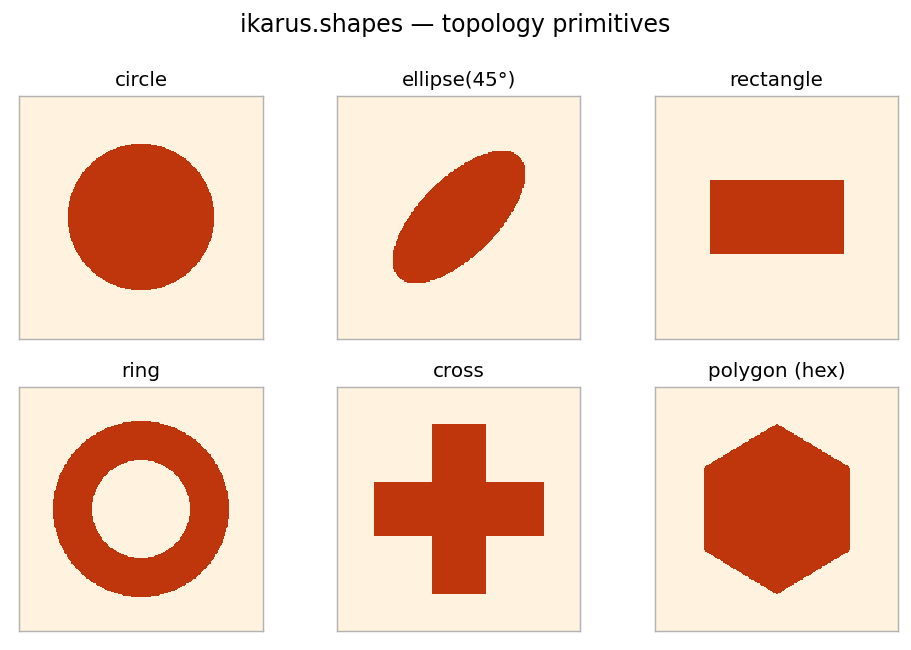
ikarus.shapes primitives, each rendered on a unit cell.Parametric shapes
Where the functions above return a fixed array, a Shape class carries
named parameters and a rotation angle — and any parameter may be a
free(lo, hi) range. That makes a Shape
usable two ways: as an ordinary topology, or as an inverse-design degree of
freedom whose parameters the optimizer chooses (see
Lesson 7).
from ikarus.shapes import Cross

# as a plain topology:
topo = Cross(arm_length=0.7, arm_width=0.2, angle=30).to_grid((128, 128))

# or hand it straight to add_layer (it rasterizes at the solver resolution):
rcwa.add_layer(200e-9, Cross(arm_length=0.7, arm_width=0.2, angle=30), ["Air", "Si"])
Shipped classes
| Class | Parameters (besides center, angle) |
|---|---|
Circle |
radius |
Ellipse |
rx, ry |
Rectangle |
width, height |
Ring |
inner_radius, outer_radius |
Cross |
arm_length, arm_width |
SplitRing |
inner_radius, outer_radius, gap_angle (the gap opens along the local +x axis, so angle rotates it) |
Every class also accepts center=(0.5, 0.5), angle=0.0,
grid_shape=(128, 128), value=1, background=0.
Shape interface
| Member | Description |
|---|---|
to_grid(grid_shape=None, overrides=None) -> ndarray |
Rasterize to an integer array. Free parameters must be supplied via overrides ({name: value}). |
img (property) |
The rendered grid — a Topology-Species-compatible attribute, so external objects exposing .img also work in add_layer. |
free_parameters() -> dict |
{name: (low, high)} for every parameter left free (including angle). |
resolved(overrides=None) -> Shape |
A concrete copy with all free parameters replaced. |
Defining your own
Subclass Shape: declare parameters in _PARAMS (a tuple of (name, default))
and implement _mask(self, u, v, p), returning a boolean mask. u, v are
coordinates already centered and rotated, and p is the resolved parameter dict.
Rotation, free-parameter handling and the inverse-design plumbing come for free.
import numpy as np
from ikarus.shapes import Shape

class Diamond(Shape):
    _PARAMS = (("half_width", 0.3),)
    def _mask(self, u, v, p):
        return np.abs(u) + np.abs(v) <= p["half_width"]
Examples
import numpy as np
from ikarus import RCWA, shapes

N = 128
# A TiO2 disk in air.
disk = shapes.circle(center=(0.5, 0.5), radius=0.3, grid_shape=(N, N))

# A cross antenna.
antenna = shapes.cross(arm_length=0.8, arm_width=0.2, grid_shape=(N, N))

# A hexagonal pillar from explicit vertices.
hexagon = shapes.polygon(
    [(0.5, 0.85), (0.8, 0.67), (0.8, 0.33), (0.5, 0.15), (0.2, 0.33), (0.2, 0.67)],
    grid_shape=(N, N),
)

# Three materials in one cell: Air (0), a Si ring (1), a TiO2 core (2).
ring = shapes.ring(inner_radius=0.25, outer_radius=0.4, grid_shape=(N, N), value=1)
core = shapes.circle(radius=0.18, grid_shape=(N, N), value=2)
topo = shapes.combine(ring, core, mode="overlay")

rcwa = RCWA(period_x=600e-9, period_y=600e-9, resolution=(N, N), n_orders=(10, 10))
rcwa.add_uniform_layer(np.inf, "Air")
rcwa.add_layer(220e-9, topo, ["Air", "Si", "TiO2"])   # indices 0,1,2
rcwa.add_uniform_layer(np.inf, "SiO2")
Best practices
- Draw on a
grid_shapefine enough that small features aren't jagged — over-resolving the shape is cheap (the layer resamples it anyway). - 1-D grating?
(Nx, 2)map +n_orders=(M, 0)— Lesson 2. - With
combine, order the maps so the intended index wins; withmode="max", give the foreground material the highervalue.